ARIA/ARIA HMI
Station-level operator interface
Module · 04

ARIA HMI.
Station-level operator interface. Not the panel you are used to.

ARIA HMI replaces '90s-era industrial interfaces with a modern, touch-first, hardware-independent HMI accessible from panel, tablet, or desktop. One configuration serves any number of stations: layouts are data, not code — the PLC stays the source of truth for the process; the platform observes, records, and displays.

For whomStation operator
CompatibilityWeb-based HMIHardware-independentMulti-stationMES/SCADA integrableOPC UA · S7Siemens PLC · Multi-PLC
Strengths

Why ARIA HMI.

  • Web-based, hardware-independentRuns in the browser on any panel, tablet, or desktop: no proprietary terminals, no vendor lock-in. The HMI is software — you pick the hardware, and you swap it without rewriting anything.
  • Real-time machine dataPLC variables over OPC UA and S7, with targeted updates per monitored node. Machine state hits the screen the moment it changes in the field, stable even with hundreds of variables in flight.
  • Modern, responsive UITouch-first, with layouts that adapt to panel, tablet, or desktop. Clear affordances, immediate feedback, and IT/EN localization: goodbye '90s interfaces.
  • MES/SCADA integrable, multi-stationConnects to ARIA MES/SCADA and to shop-floor systems — orders, recipes, batches, KPIs, history. One configuration serves any number of stations: the production context a traditional HMI never sees, at the operator's fingertips.

What it does, concretely.

  • Live PLC connection via ARIA Connector (OPC UA + S7)
  • Macro-components: servos · valves · 3D views · jog control
  • Command mode: bottom bar with contextual controls
  • Pages: station · overview · recipe · alarms · settings · part-status
  • Touch-first, hardware-independent: panel, tablet, or desktop
  • Integrable with ARIA MES/SCADA and shop-floor systems; IT/EN localization
ScreensIn production · live

In production, not on slides.

8 main ARIA HMI screens with technical captions. They are real screenshots captured on a live plant — what you see here is exactly what the shift lead sees.

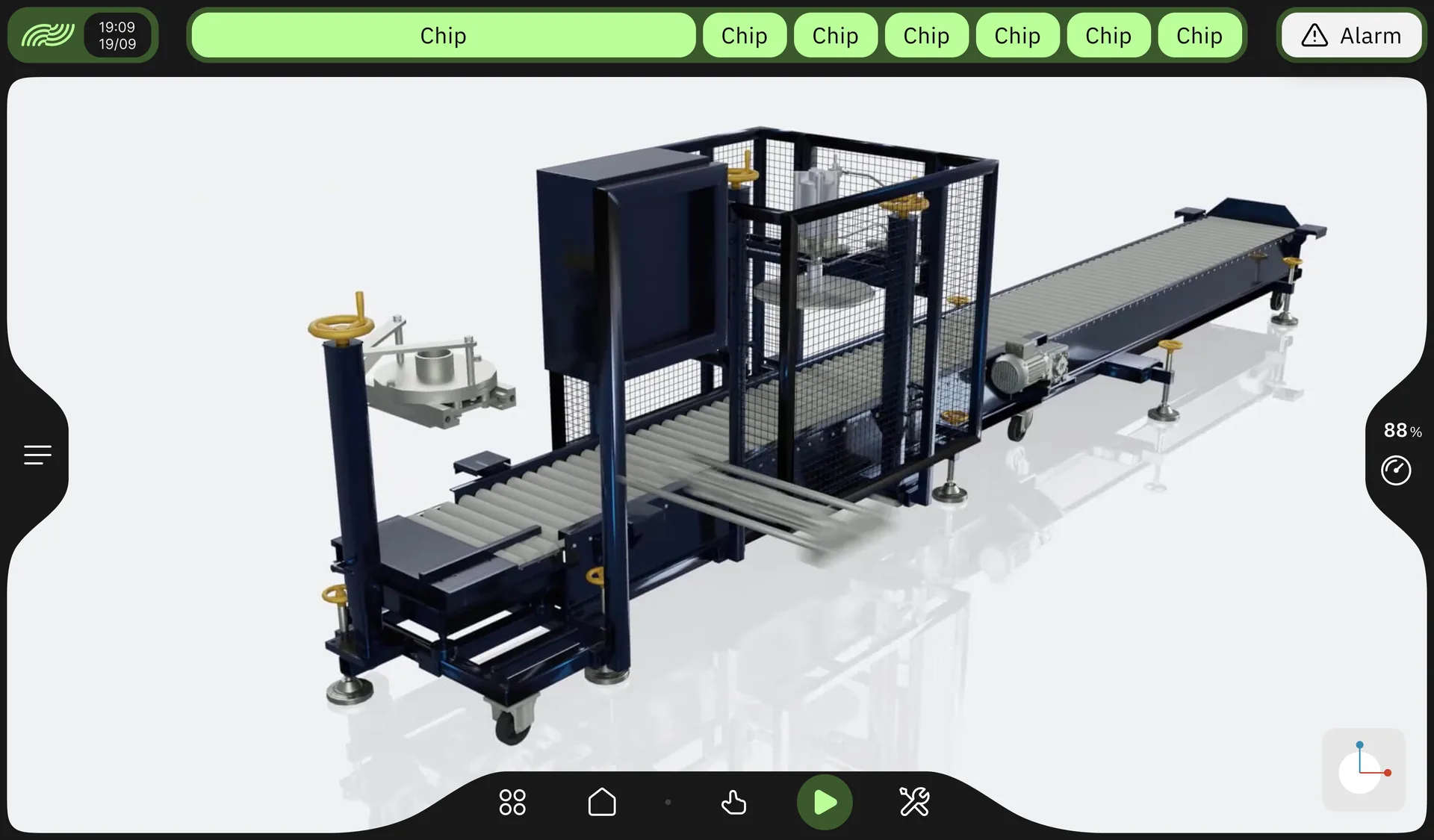
ARIA HMI — full-screen 3D station viewer with the machine model and navigation controls
Screen · 01

3D station viewer

The station full-screen in 3D, with live axis feedback: the model moves as the machine moves. It is the view for anyone who does not know the layout by heart — an external maintenance engineer, a new shift — to work out which assembly is being discussed. Commands still go through the PLC: no bypass of the single source of truth.

  • Full-screen 3D view with live axis feedback
  • Immediate orientation on the assembly in question
  • Commands always through the PLC, no bypass
  • Speed override always within reach
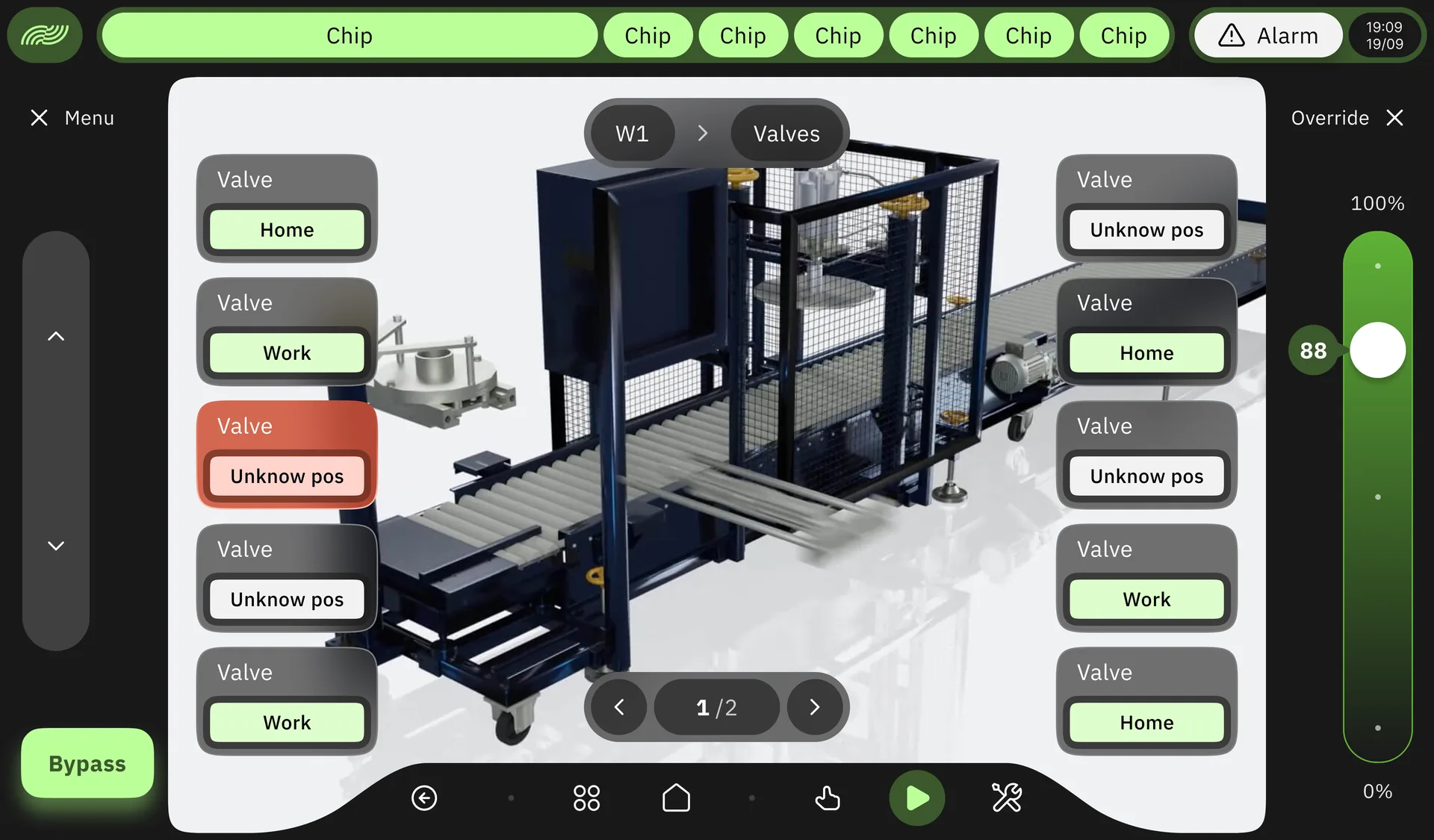
ARIA HMI — station valve status: one card per actuator showing home, work, or unknown position, with unconfirmed positions highlighted
Screen · 02

Valve and actuator status

Every valve on the station with the position the PLC reports: home, work, or unknown — highlighted when the sensor does not confirm the stroke. This is the screen that shortens a stoppage diagnosis: you see straight away which actuator did not arrive, instead of opening the cabinet with a tester.

  • One card per valve with the position from the PLC
  • Unconfirmed positions highlighted
  • Pagination for stations with many actuators
  • 3D machine context always visible
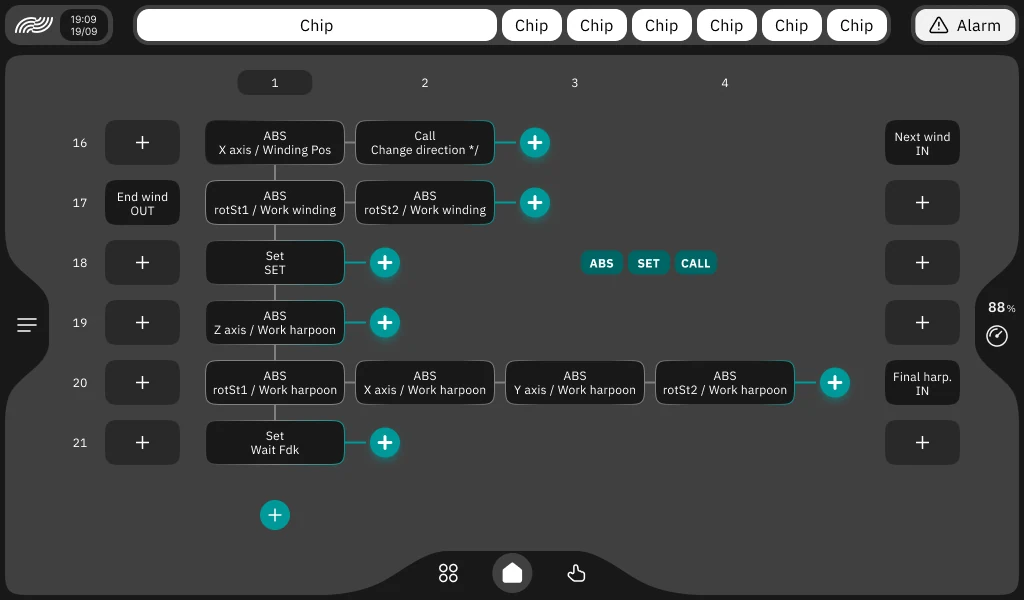
ARIA HMI — visual recipe sequence editor with steps as move, set and call blocks and parallel branches side by side
Screen · 03

Recipe sequence editor

The recipe as a sequence rather than a parameter table: every step is a block — an absolute axis move, a value set, a call to a sub-sequence. Blocks side by side on the same row are the ones that run in parallel. You insert a step where it is needed and reorder the sequence where the cycle changed, without reopening the PLC program. Parameters reach the PLC over OPC UA, validated before activation.

  • Steps as blocks: move, set, call
  • Parallel branches side by side on one row
  • Insert and reorder steps inline
  • Written over OPC UA with validation
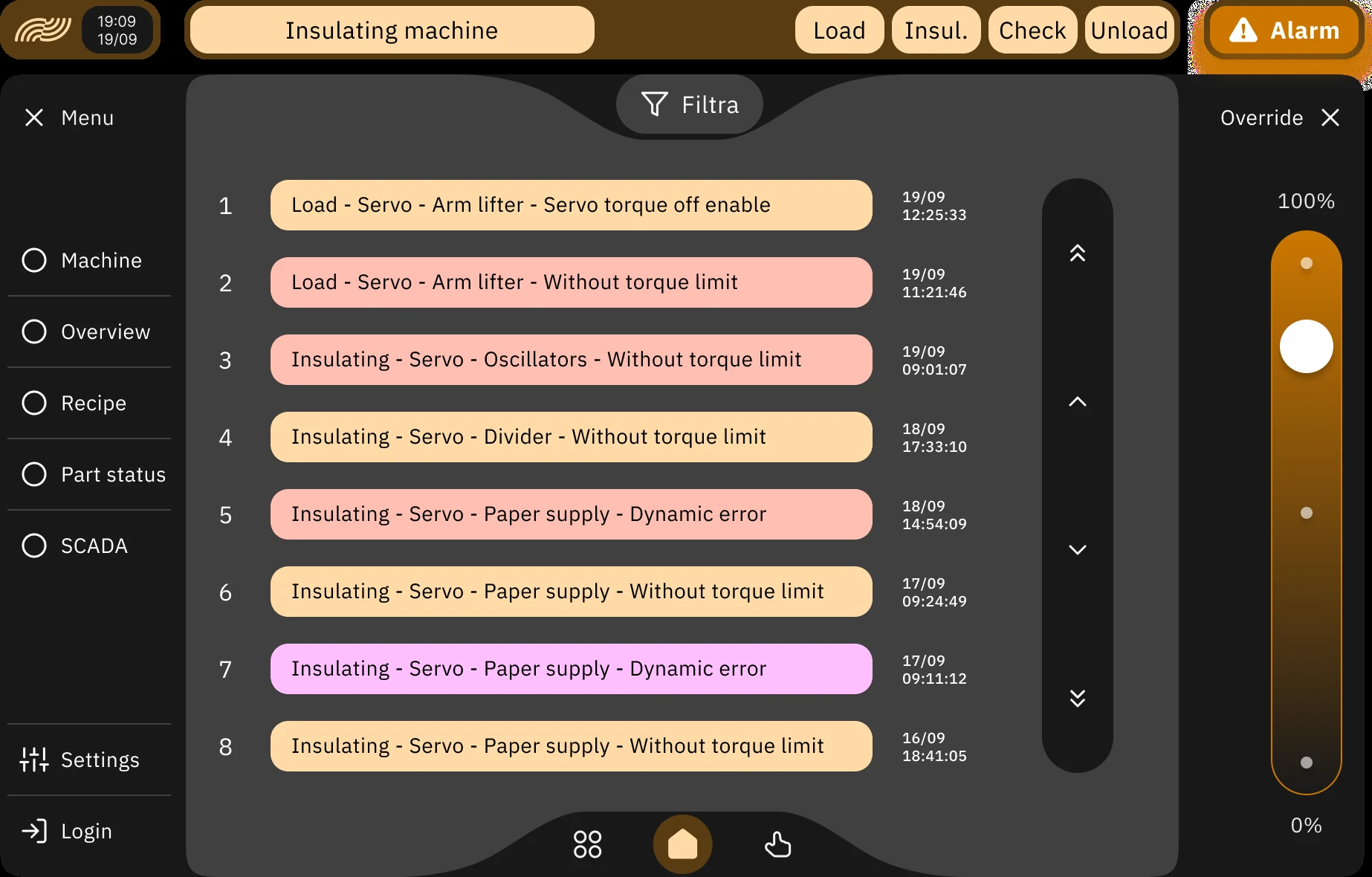
ARIA HMI — machine alarm history with the fault path by phase and component, date and time to the second, and colour by severity
Screen · 04

Alarms and history

The machine's alarm history, most recent first: every row carries the fault path — phase, assembly, component, condition — with the date and time to the second, and the colour states the severity. Phase tabs (load, process, check, unload) and the filter narrow the list when it gets long. When an alarm crosses its time threshold, escalation carries it to the SCADA andon.

  • Fault path: phase · assembly · component · condition
  • Date and time to the second on every event
  • Colour by severity, most recent first
  • Escalation to the SCADA andon past the time threshold
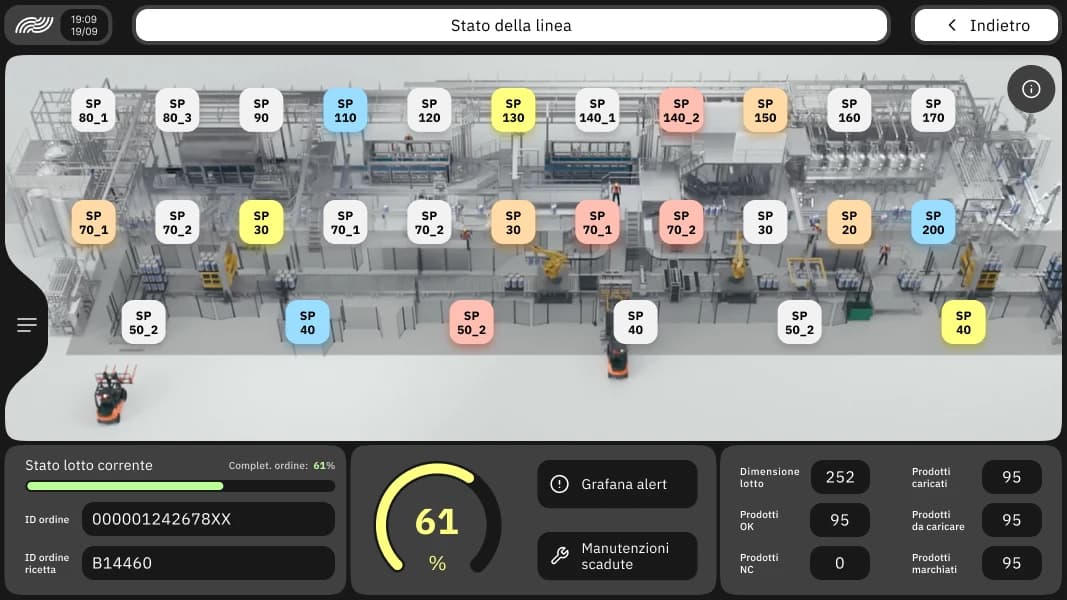
ARIA HMI — Line status screen: 3D plant plan with a state pill for every station and a current-batch bar showing progress and part counts
Screen · 05

Line status

The screen the shift starts from: a 3D plan of the line with one pill per station, colour-coded by state — running, waiting, in alarm. Along the bottom, the current batch: order ID, recipe, percentage progress, batch size, and counts of parts loaded, OK, and non-conforming. The operator sees where the line is stopped before picking up the phone.

  • 3D line plan, one pill per station
  • Colour by state: running · waiting · in alarm
  • Current batch: order, recipe, progress
  • Counts of parts loaded, OK, and non-conforming
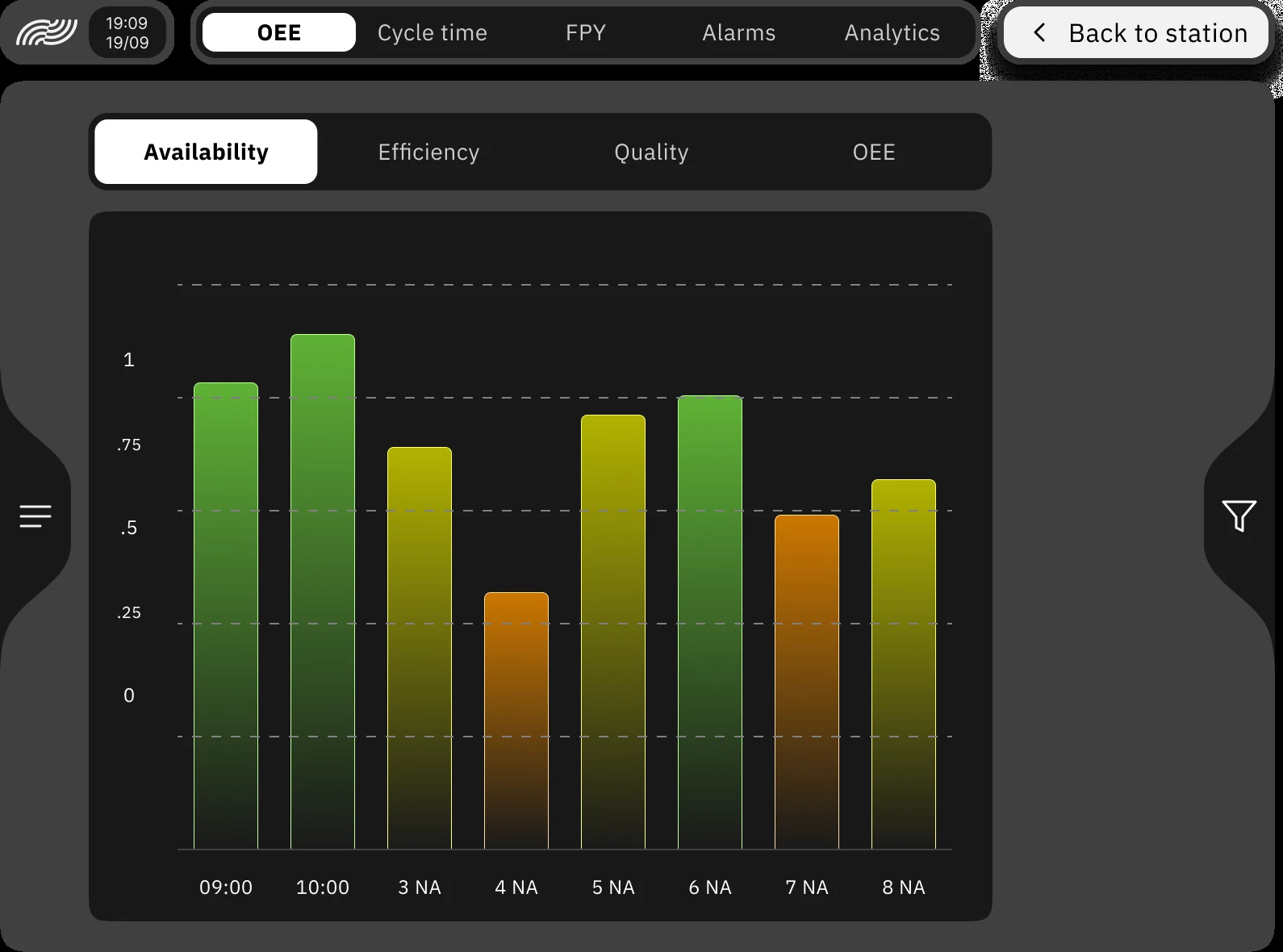
ARIA HMI — station OEE tab with availability, efficiency, quality and OEE views and the availability bar chart per time band
Screen · 06

OEE · station availability

The station screen OEE tab, across four views: availability, efficiency, quality, and OEE. The bar chart splits the shift by time band and the colour coding pulls the eye to the hours that were lost — green holds, amber slows, orange stopped. Alongside sit the station's other analyses: cycle time, FPY, alarms. The shift lead sees whether the station is meeting plan; the operator sees which hour of the shift lost the time.

  • Four views: availability · efficiency · quality · OEE
  • Bars per time band with colour coding
  • Analyses alongside: cycle time, FPY, alarms
  • Filter on the time window
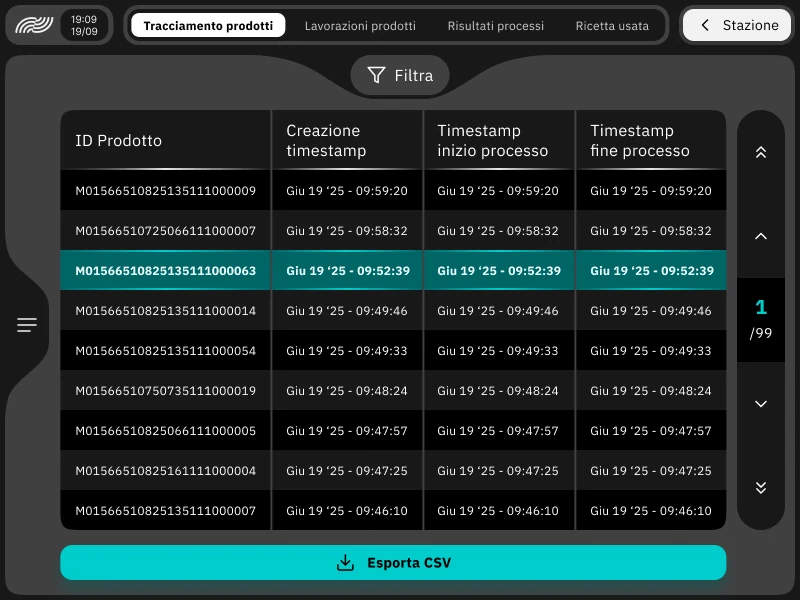
ARIA HMI — Part traceability tab with the product ID table and creation, process start and process end timestamps, with CSV export
Screen · 07

Part traceability

Station-level traceability table: product ID, creation timestamp, process start and end for every part that went through the workstation — 99 pages of history here, one row per part. Alongside sit the sibling tabs: operations, process results, and the recipe used on that part. The filter narrows the window; CSV export hands it to quality or line-level traceability.

  • Product ID + creation/start/end timestamps
  • Sibling tabs: operations, results, recipe used
  • Filter and pagination over long history
  • CSV export for quality and traceability
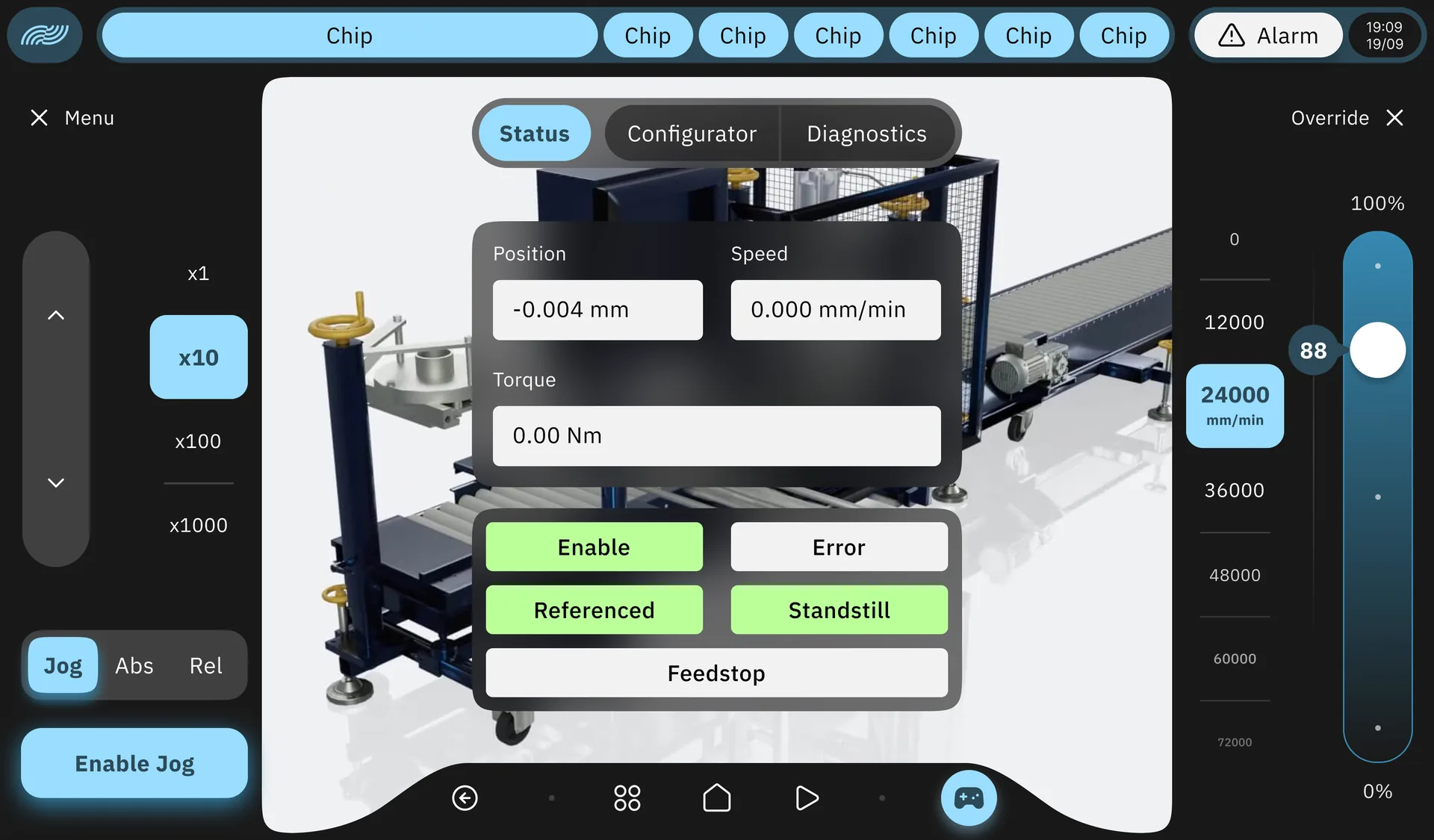
ARIA HMI — station Status tab showing axis position, speed and torque, drive status flags, jog panel with multipliers and speed override
Screen · 08

Axis status and manual motion

The station as the operator sees it: axis position, speed, and torque refreshed in real time, with the drive status flags — enabled, referenced, standstill, error, feedstop. On the left the jog panel for setup motion, with an x1-to-x1000 multiplier and Jog / absolute / relative modes; on the right the speed override. Every component subscribes to its single OPC UA node: targeted updates and stable frame rates even with hundreds of monitored variables.

  • Position · speed · torque in real time
  • Drive flags: enabled · referenced · standstill · error
  • Jog from x1 to x1000, Jog / absolute / relative modes
  • Targeted per-OPC-UA-node updates
Questions · scope · cost

Let's assess ARIA HMI on your case.

Let's see whether ARIA HMI fits your case: what connects to the systems you already run, what changes for the people using it, and what it costs at your scale.

Do you resell or refer industrial software? See the IOMA partner programme

You might also want

Guides that go deeper on these topics.