ARIA/ARIA Warehouse
Warehouse management integrated with the line
Module · 03

ARIA Warehouse.
Warehouse management integrated with the line.

ARIA Warehouse shares its backend with SCADA: no nightly sync between MES and WMS — same master data, same history, same view of the process. Real-time tables with row-level change highlighting, multi-warehouse with active user context, integrated AMR fleet manager.

For whomWarehouse staff · Logistics · Department lead
CompatibilityIntegrated WMSReal-timeMulti-warehouseAMR fleetBatch traceabilityOn-prem · cloud
Strengths

Why ARIA Warehouse.

  • Same source of truth as the fieldNo nightly sync between MES and WMS — same master data, same history, same real-time. Warehouse and line breathe together.
  • Configuration, not codeNew warehouse entities (movements, orders, locations) are added via configuration. No green-field development for every customer.
  • AMR fleet commandMission dispatch, per-robot telemetry, and warehouse locations bound to the fleet manager's map nodes. Navigation stays with the vendor's fleet manager; here you decide what moves and where to.
  • Stock that follows the moveOn mission completion the transfer is written into the warehouse: stock stops chasing the material. Enabled in stages — you start in observation only.

What it does, concretely.

  • Configuration, not code: new warehouse entities in a few lines
  • Real-time tables with row-level change highlighting
  • Standardized forms, printouts, and dialogs
  • AMR mission dispatch on lift, roller, CTU, and forklift
  • Fleet telemetry: status, battery, node, running mission
  • Warehouse locations mapped to fleet-manager nodes
  • AMR moves as an automation action, triggered by a line event
  • Multi-warehouse with active user context
  • Same master data and traceability as SCADA — no double truth
ScreensIn production · live

In production, not on slides.

4 main ARIA Warehouse screens with technical captions. They are real screenshots captured on a live plant — what you see here is exactly what the shift lead sees.

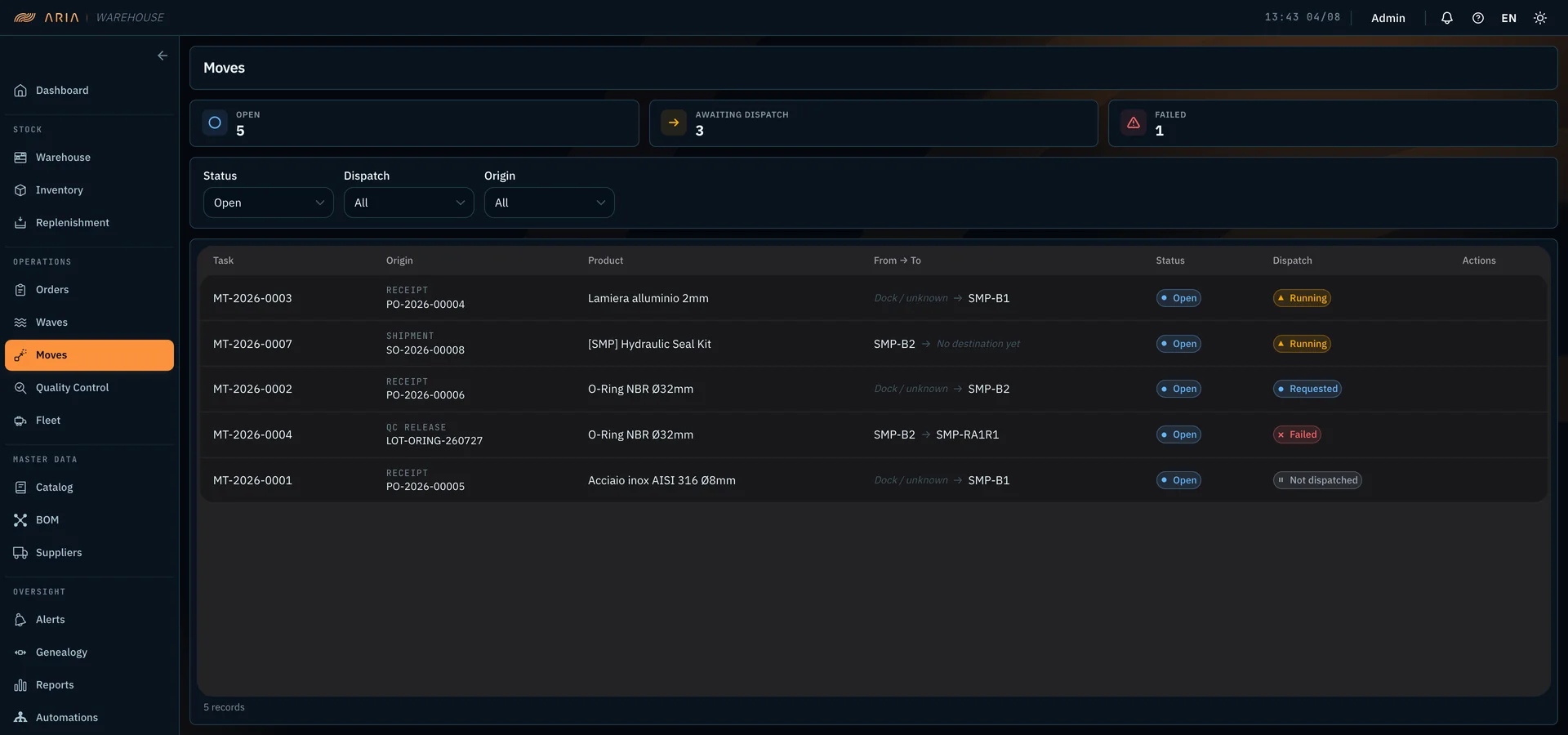
ARIA Warehouse — movements ledger with origin, product, from-to route and dispatch state, plus counters for open, awaiting and failed movements
Screen · 01

Movements and dispatch

The ledger of open movements, each with the origin that created it: a receipt from a purchase order, a shipment, a release from quality control. Every row carries the route — from where to where — and the dispatch state toward the vehicle that has to run it: requested, running, failed, not dispatched yet. The counters up top say how many movements are open, how many are waiting for dispatch, and how many failed: this is the warehouse work queue, not an end-of-period report.

  • Origin tracked: receipt, shipment, QC release
  • Route from → to and dispatch state on every row
  • Counters for open · awaiting dispatch · failed
  • Filters by status, dispatch, and origin
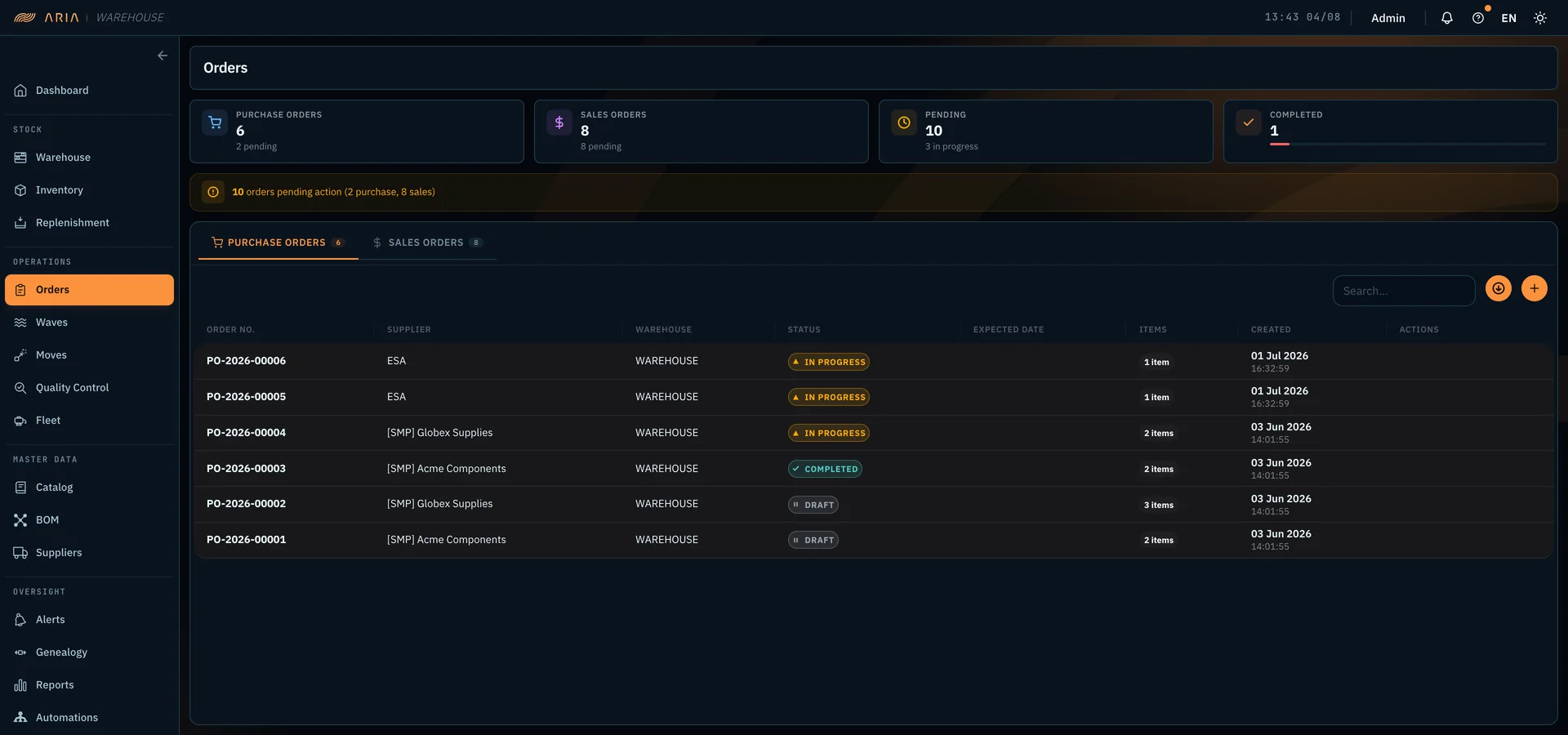
ARIA Warehouse — purchase order list with supplier, warehouse, status and expected date, plus counters for purchase, sales, pending and completed orders
Screen · 02

Purchase and sales orders

Purchase and sales orders in one place, each with its state: draft, in progress, completed. The bar up top says how many orders are waiting for an action: ten here, two purchase and eight sales. The day starts there rather than in an inbox. Every row carries the supplier, the destination warehouse, how many lines it holds, and the expected date.

  • Purchase and sales in one view, with the totals
  • State per order: draft · in progress · completed
  • How many orders await an action, up top
  • Supplier, warehouse, lines, and expected date
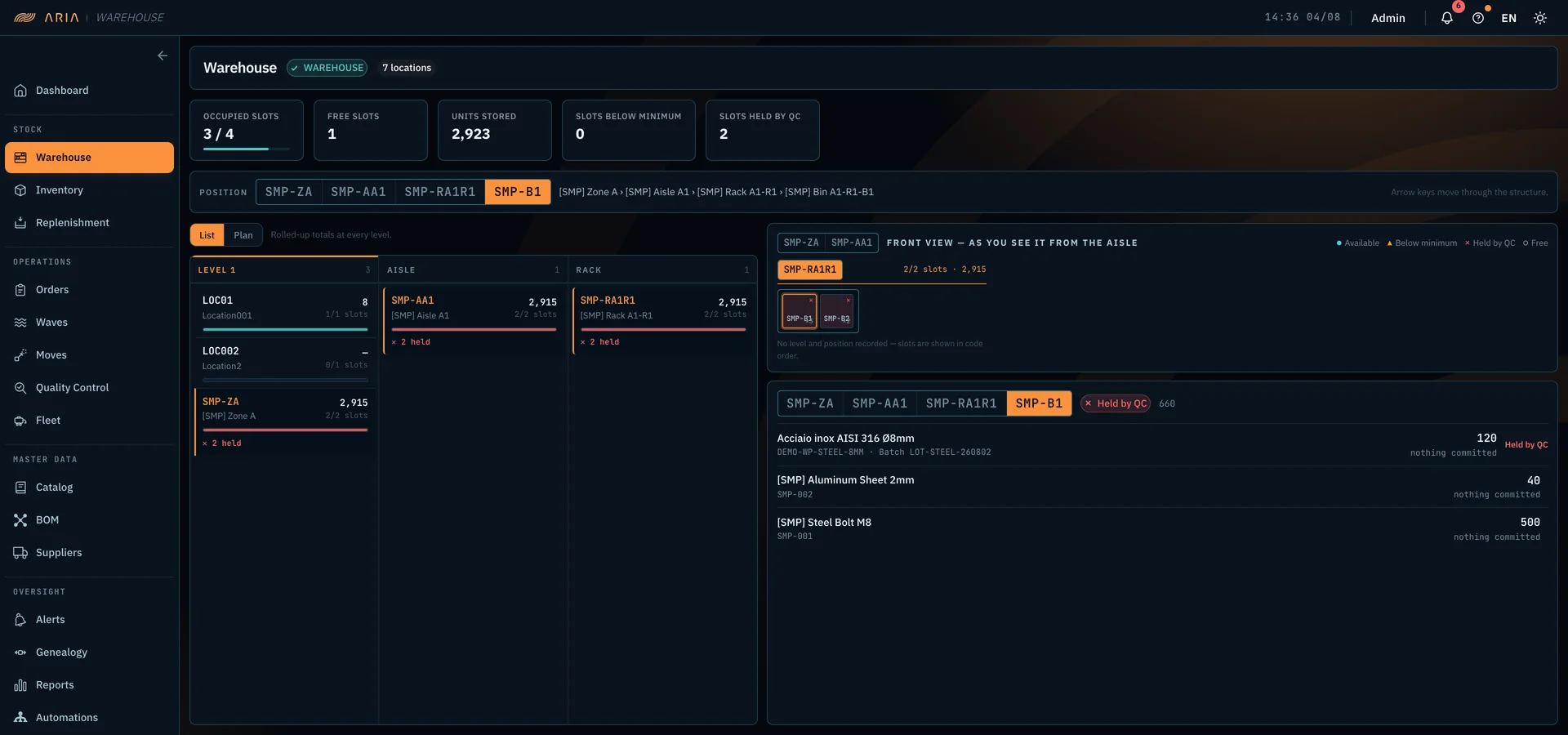
ARIA Warehouse — warehouse structure with the zone-aisle-rack-bin path, front view of the rack showing each bin state, and the contents of the selected bin with item, batch and quantity
Screen · 03

Structure and slot contents

The warehouse as you walk it: zone, aisle, rack, bin — the bar along the top is the path, and the arrow keys move through it. On the right, the front view of the rack, the one the operator sees from the aisle, with every bin colour-coded: available, below minimum, held by quality control, free. Below it, the contents of the chosen bin — item, code, batch, and quantity — with whatever is committed or awaiting release called out. The active warehouse is the one named up top: anyone working across plants switches context from there.

  • Path zone › aisle › rack › bin
  • Front view of the rack, as seen from the aisle
  • Colour by state: available · below minimum · in QC · free
  • Bin contents: item, batch, committed quantity
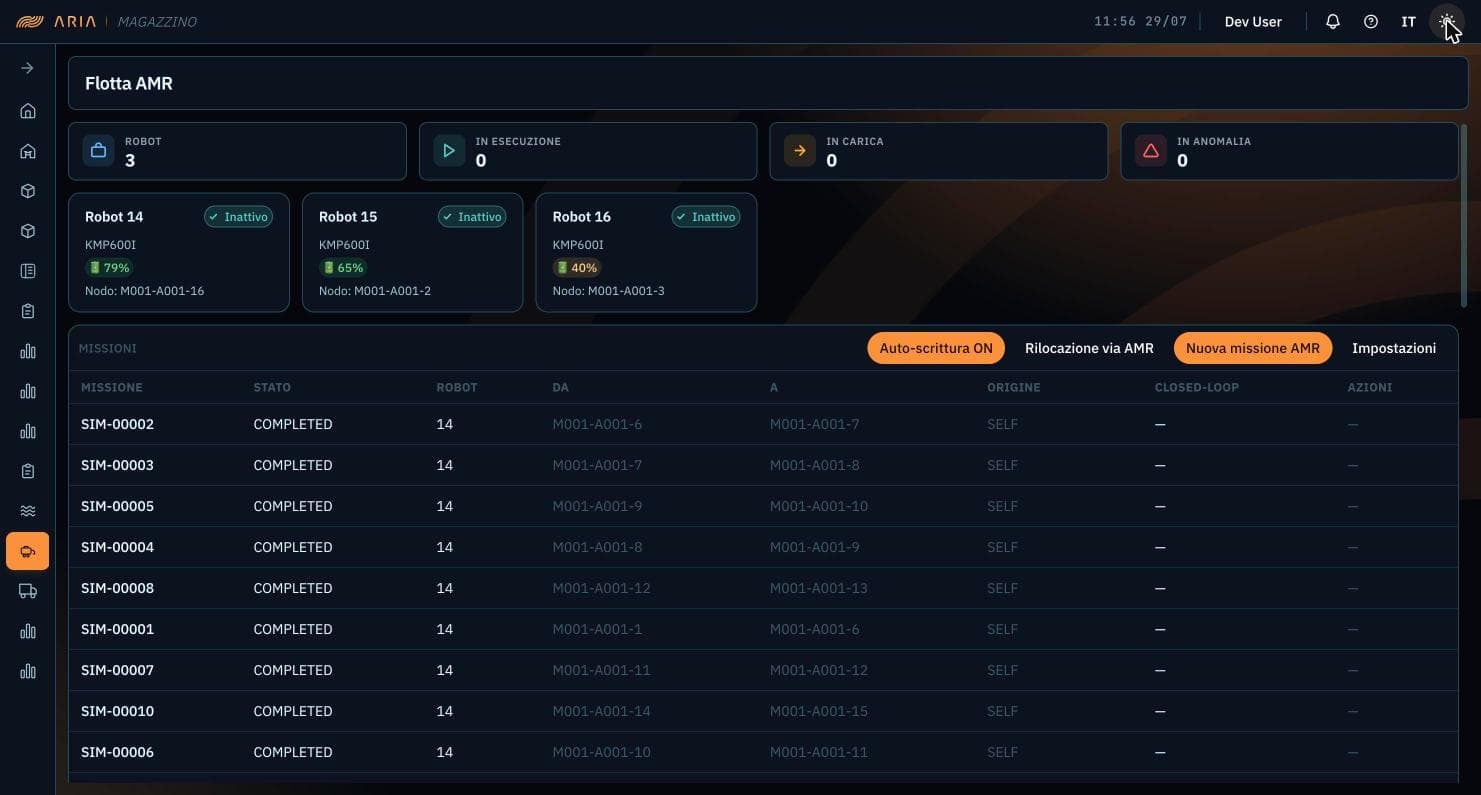
ARIA Warehouse — AMR fleet screen: counters for robots active, running, charging, and in fault, a card per robot with battery level and node, and a mission table with from/to route, origin, and closed-loop status
Screen · 04

AMR fleet

Mobile-robot fleet status: robots active, running, charging, and in fault, with each unit's battery and node. Below, the missions with origin, route, and the state of the stock write-back.

  • Battery + node
  • Missions with outcome
  • Automatic stock update
Questions · scope · cost

Let's assess ARIA Warehouse on your case.

Let's see whether ARIA Warehouse fits your case: what connects to the systems you already run, what changes for the people using it, and what it costs at your scale.

Do you resell or refer industrial software? See the IOMA partner programme

You might also want

Guides that go deeper on these topics.