ARIA/ARIA MES/SCADA
MES & SCADA · line supervision cockpit
Module · 02

ARIA MES/SCADA.
MES & SCADA · line supervision cockpit.

ARIA MES/SCADA is the visible heart of the platform: MES and SCADA combined. It reflects field events in real time: every operator, shift lead, or supervisor sees the same information, refreshed at the millisecond. It governs orders, batches, recipes, and production traceability. Configurable per installation via hierarchical roles and toggleable modules, it talks to PLCs through ARIA Connector and retains process history for analytics and traceability.

For whomOperator · Shift lead · Supervisor · Manager · Plant admin
CompatibilityMES & SCADAReal-timeOPC UA · S7On-prem · cloudMulti-PLCOEE · traceabilityAMR-ready
Strengths

Why ARIA MES/SCADA.

  • Real time, for realNo polling, no manual refresh. Every batch change, alarm, or station status lands in the dashboard in real time.
  • End-to-end traceabilityGenealogy of batches, products, and process parameters. Every part has its history, every history is exportable.
  • Configurable per installationToggleable modules and hierarchical roles. Each customer sees only the sections they need, with the permissions they're entitled to.

What it does, concretely.

  • Configurable dashboard with real-time data from PLC and process
  • Traceability of batches, products, and process parameters
  • Visual editor for product flows and master recipes
  • Multi-channel andon: maintenance · quality · logistics · safety
  • 10+ analytics tabs · aggregated KPIs · OEE · energy consumption
  • Hierarchical role-based permissions + installation-level module toggles
  • Shift changeovers, order dispatch, product and customer master data
  • AMR automations on line events, authored from supervision
  • AMR fleet visibility from the line desk, alongside process alarms
Tour

Inside the interface, live.

ARIA MES/SCADA · Live demo

Line dashboard, cycle-time and batch-summary analytics, the visual product-flow editor, and the dispatch alarm queue.

ScreensIn production · live

In production, not on slides.

5 main ARIA MES/SCADA screens with technical captions. They are real screenshots captured on a live plant — what you see here is exactly what the shift lead sees.

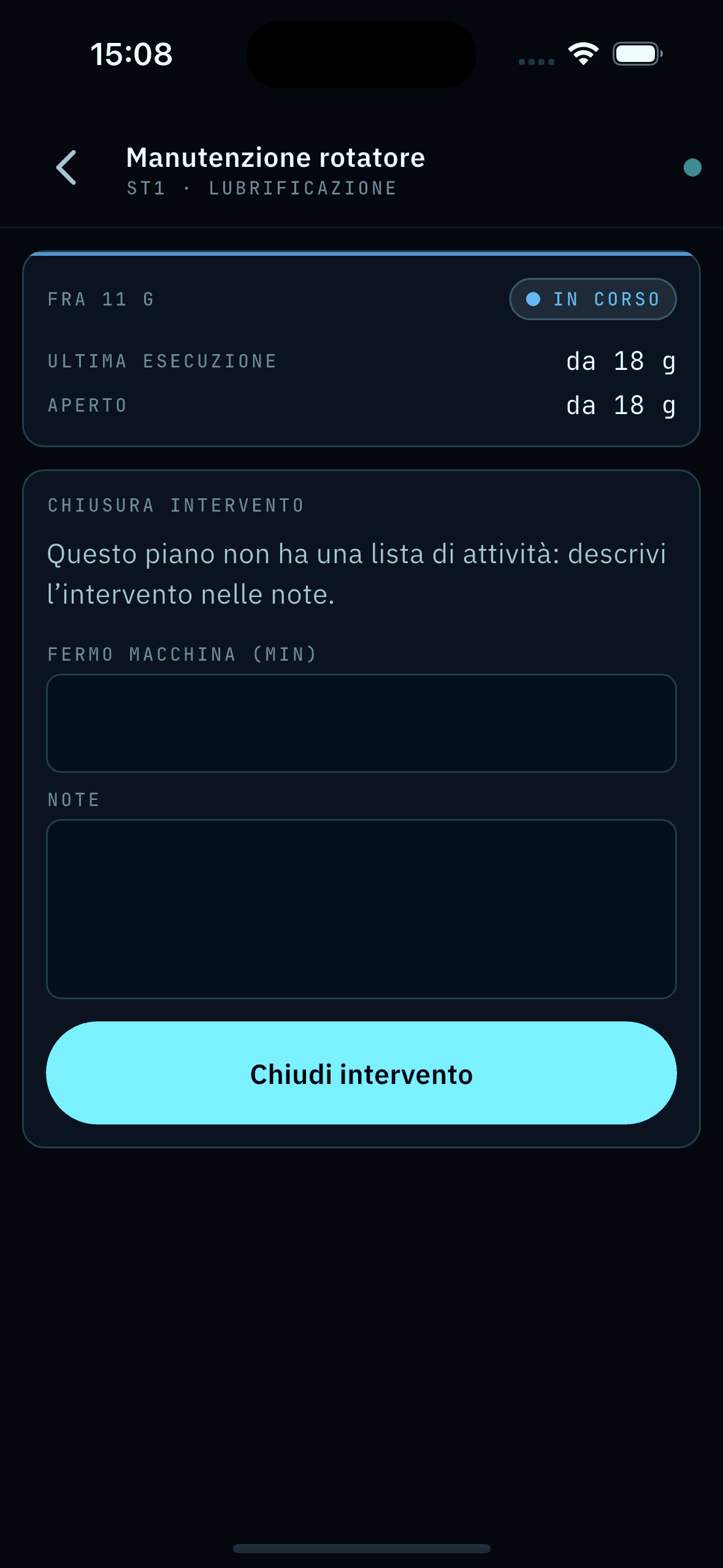
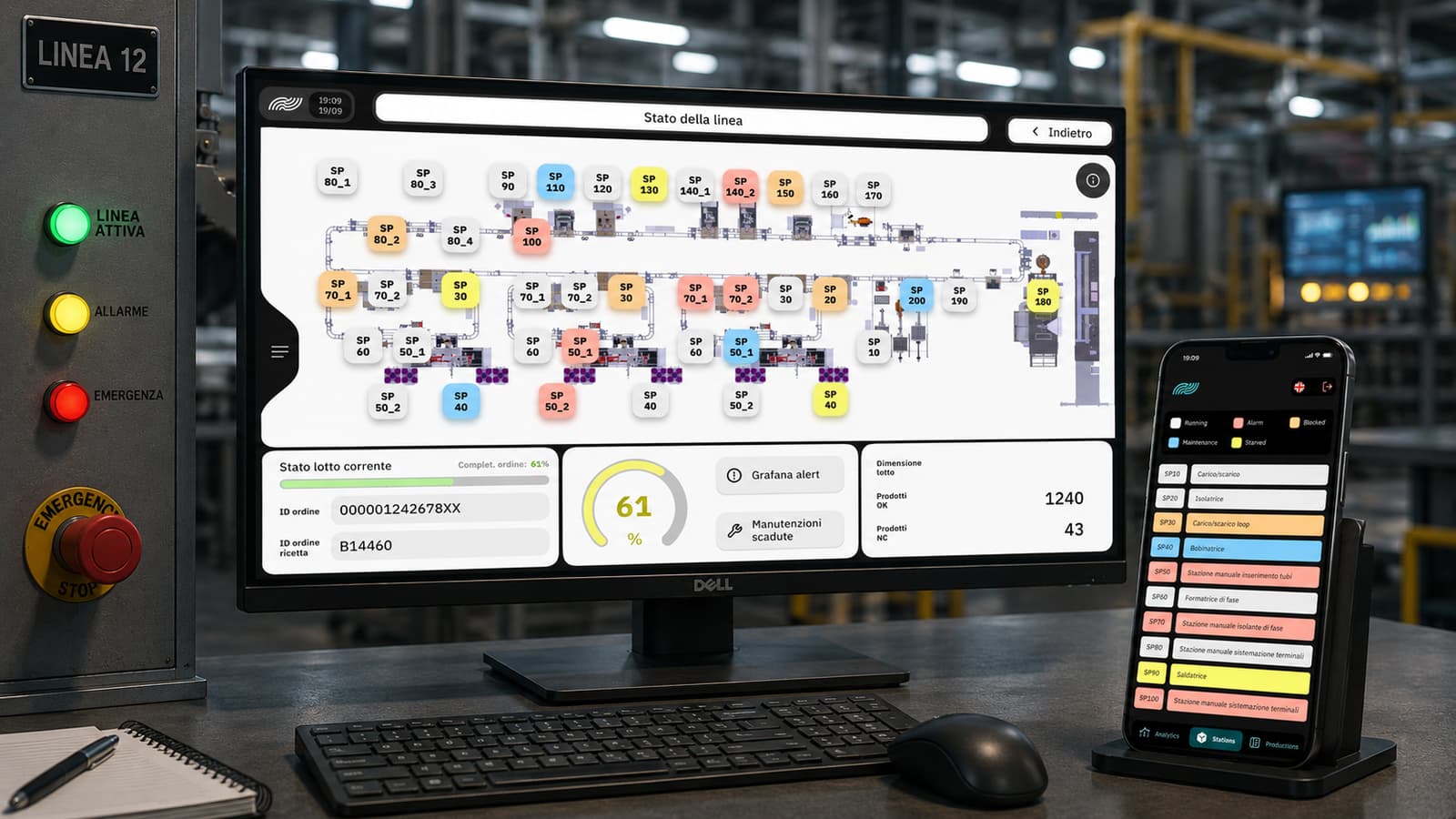
ARIA MES/SCADA — Line Status screen with plant layout, OEE KPIs, current batch/recipe, and mobile-app mirror
Screen · 01

Line status — overview

The screen the shift lead opens first: plant layout with every station, real-time status for each (Running · Alarm · Blocked · Maintenance · Starved · Stowed), current OEE, batch ID, and active recipe. The same view is mirrored on the mobile app for those not at a shop-floor terminal.

  • Full line layout, each station a node
  • Real-time status + Running/Alarm/Blocked/… legend
  • Current OEE · batch · active recipe
  • Mirrored 1:1 on the mobile app
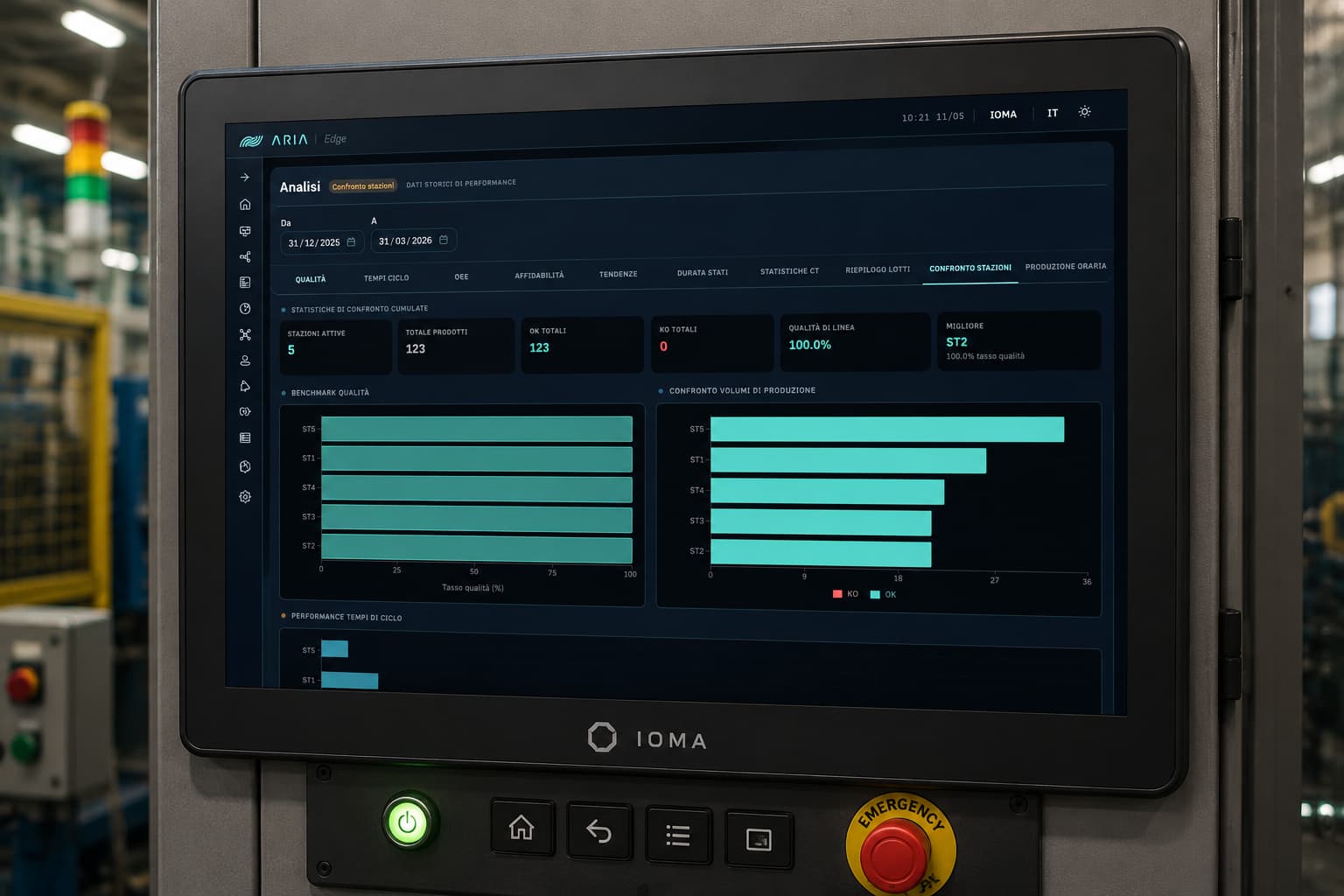
ARIA MES/SCADA Analytics screen — station comparison with cumulative KPIs, quality benchmark, production volume comparison, and cycle-time performance
Screen · 02

Analytics · station comparison

Cumulative analytics dashboard for the line. Active stations, total parts, OK/KO, line quality, and best station up top; below, quality benchmark, production-volume comparison, and per-station cycle-time performance over any time window. It's the first view a shift lead opens to understand what happened over a shift or a week.

  • Cumulative KPIs · active stations, parts, OK/KO, line quality, top station
  • Per-station quality benchmark
  • OK · KO production volume comparison
  • Cycle-time performance
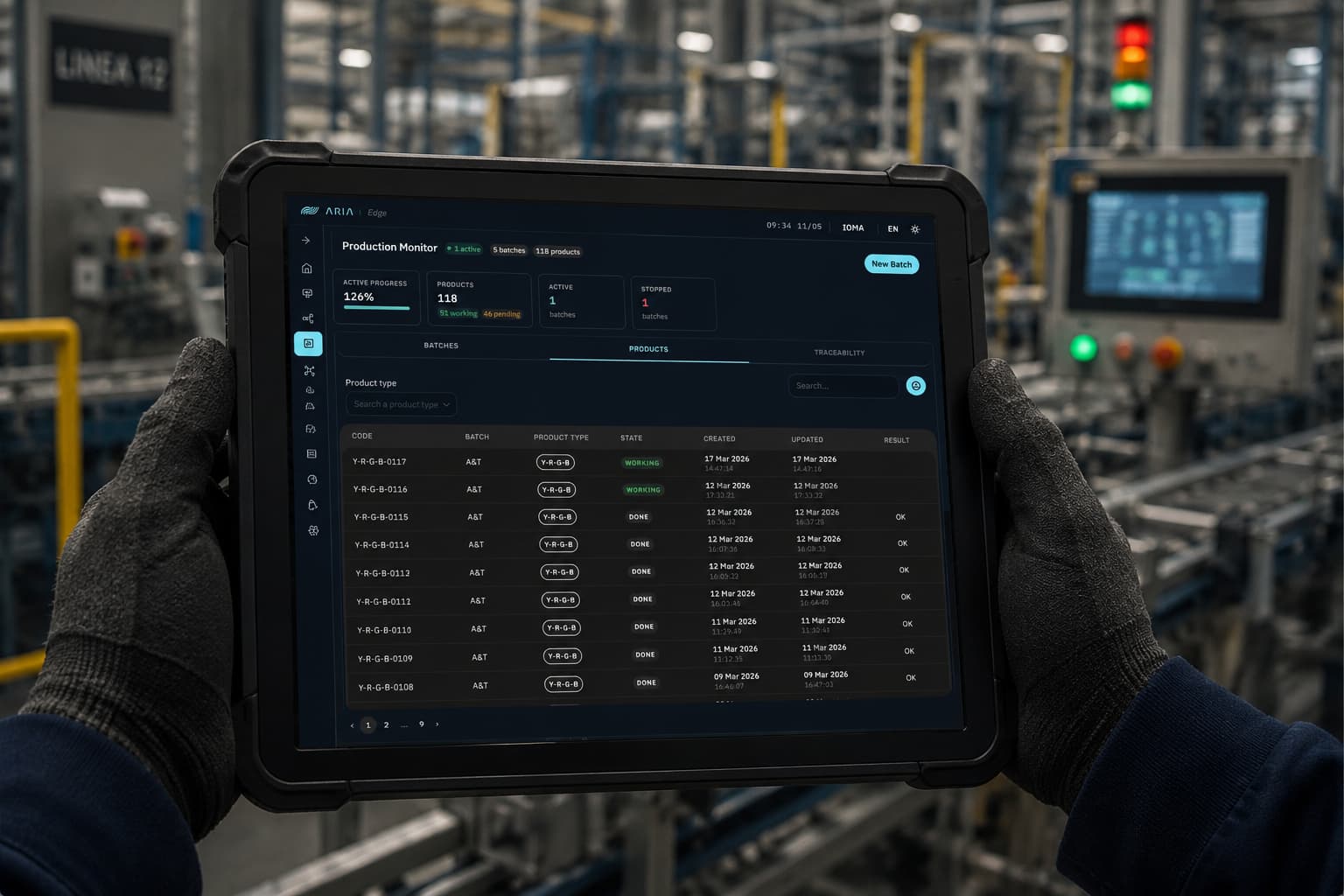
ARIA MES/SCADA — Production Monitor with line KPIs (active progress, parts, batches) and product table with code, batch, status, and timestamps
Screen · 03

Production monitor · parts on the line

The view the shift lead keeps open alongside Line Status: up top, production-plan progress, total parts with working/pending, active and stopped batches. Below, the products table with code, batch, product type, status, creation timestamp, last update, and OK/KO outcome. Batches · Products · Traceability tabs to drill down in one click.

  • Line-status KPIs — active progress, parts, active/stopped batches
  • Batches · Products · Traceability tabs
  • Products table with status, timestamps, and outcome
  • Product-type filter · live search
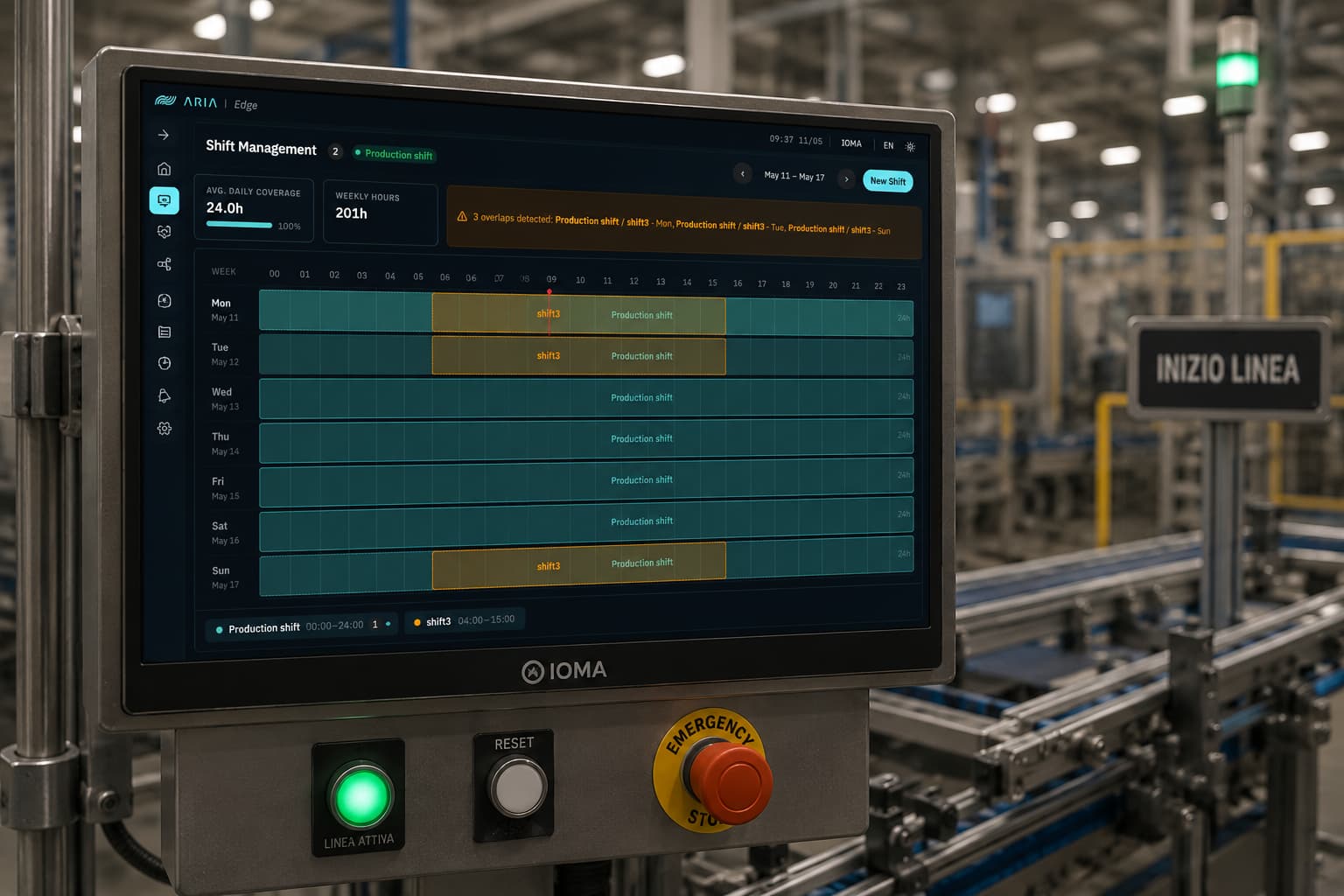
ARIA MES/SCADA — Shift Management with weekly heatmap of production shifts, daily coverage and weekly hours KPIs, overlap detector
Screen · 04

Shift management

Weekly shift planning with a Mon-Sun × 24h heatmap. Average daily coverage and weekly hours summarized in two KPIs. An overlap-detector banner automatically flags shift overlaps: here, 3 conflicts between Production shift and shift3 on Mon, Tue, Sun. Multi-shift, drag to extend the window, no extra rows of Excel for whoever runs the plan.

  • Mon-Sun × 24h weekly heatmap
  • Average daily coverage + weekly hours
  • Automatic overlap detector across shifts
  • Multi-shift (Production / Shift3 / …)
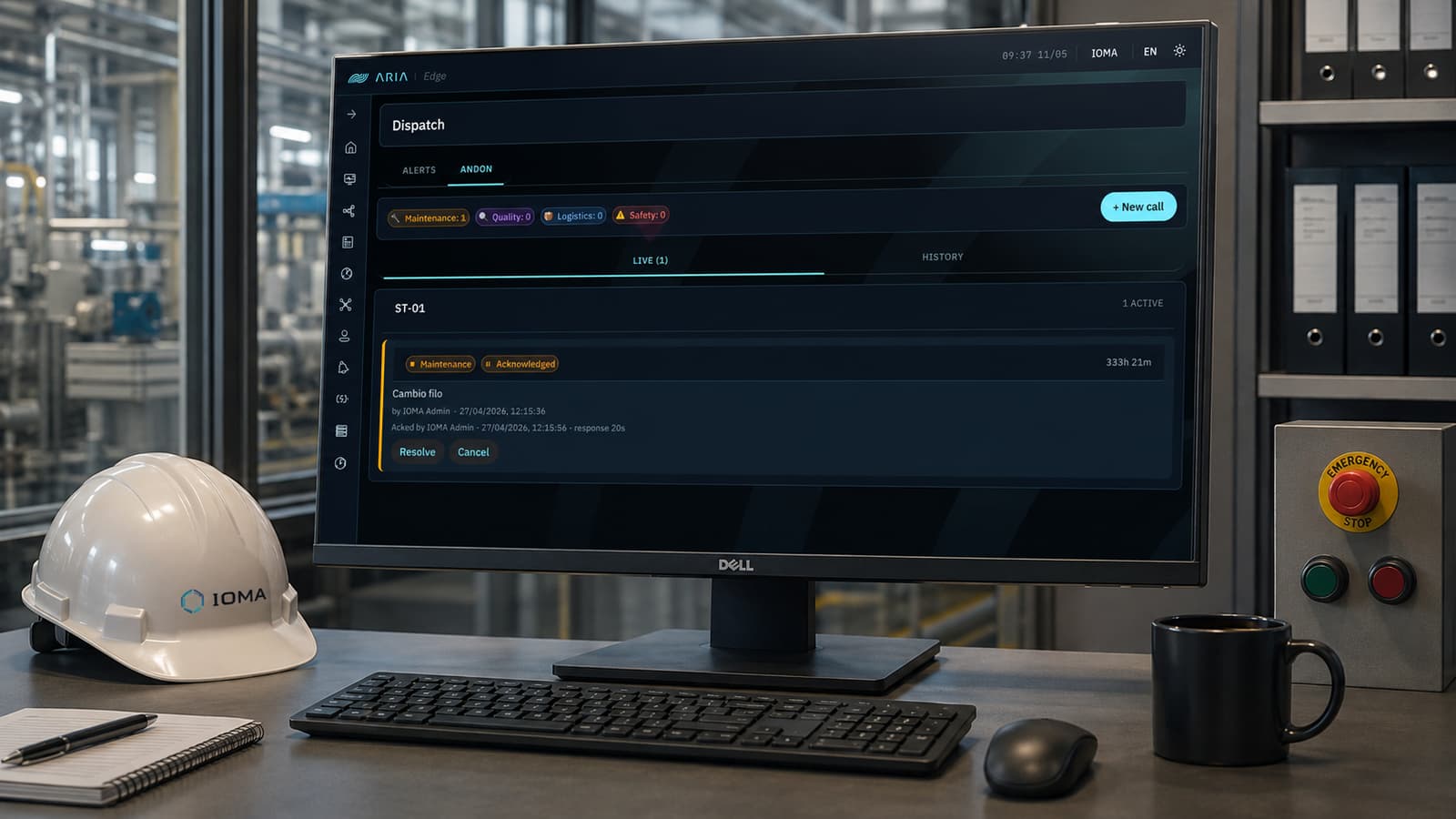
ARIA MES/SCADA — Andon dispatch with Maintenance/Quality/Logistics/Safety categories, live event list with station, status, cause, and response time
Screen · 05

Dispatch · andon calls

The line's andon control center, organized by category — Maintenance, Quality, Logistics, Safety — with a live counter at the top. Every event shows station, type, status (Acknowledged / In progress / Resolved), cause, who opened it, timestamp, response time, and open duration. Live tab for the present, History for the archive. Resolve or Cancel straight from the event.

  • 4 categories · Maintenance, Quality, Logistics, Safety
  • Live + History tabs
  • Response time and open duration tracked
  • Resolve / Cancel per single event

Just need traceability? Discover ARIA Track

Plans & pricing

Three editions, one per-station fee

A transparent model: you pay per station — support, maintenance, and updates are included.

Track

Traceability & genealogy only
€1,000per station / year

≈ €83 per station per month

Included:

  • Batch and part genealogy, down to the single part
  • Search by batch and by product
  • Event history and exportable traceability
  • Real-time station status
  • Line master data: stations, PLCs, batches

Discover ARIA Track

Lite

Monitoring & traceability
€1,600per station / year

≈ €133 per station per month

Included:

  • Product traceability and genealogy, down to the part
  • Live monitoring: stations, topology, cycles, batches
  • Alarms with acknowledge
  • Line master data: stations, PLCs, products, processes
  • Maintenance log and work-order status
  • Essential KPI dashboard
  • Users, roles, and system status

Pro

Complete MES/SCADA suite
€2,300per station / year

≈ €192 per station per month

Everything in Lite, plus:

  • AURA, the built-in AI assistant
  • OEE analytics: availability, performance, quality, MTBF
  • Energy analysis and historical yields
  • Configurable reports and exports (shift, batch, OEE)
  • Recipes with versioning and work instructions
  • Product catalog and bill of materials (BOM)
  • Shifts, handover, order dispatch, andon
  • Flow orchestration: visual editor and PLC commands
  • Advanced alarms: custom rules and notifications
  • Integration APIs

Turnkey installation

From €4,000 (Track) · €8,000 (Lite) · €10,000 (Pro), + €500 per station on Track and €800 on Lite and Pro

One-off: platform setup and IT integration, PLC node mapping, blueprint, testing, and commissioning. Example: a 4-station line = €6,000 on Track, €11,200 on Lite, €13,200 on Pro.

  • Prices exclude VAT. Annual fee paid upfront with yearly indexation; includes the usage license, Standard 8×5 support, maintenance, and updates.
  • Premium 24×7 SLA (4-hour response, scheduled on-site visits): +15% on the fee.
  • Discounts: −5% with 2-year prepayment, −10% with 3-year; −10% from the second plant.
  • Station = each production unit monitored in ARIA (a workstation, machine, or line supervision point). The number of stations depends on the plant architecture and supervision points, not on the number of machines.

How much does an MES or SCADA cost? The guide with market ranges

Questions · scope · cost

Let's assess ARIA MES/SCADA on your case.

Let's see whether ARIA MES/SCADA fits your case: what connects to the systems you already run, what changes for the people using it, and what it costs at your scale.

Do you resell or refer industrial software? See the IOMA partner programme

You might also want

Guides that go deeper on these topics.