ARIA/ARIA Track
Production traceability and genealogy
Module · 01

ARIA Track.
Production traceability and genealogy.

ARIA Track is the suite's entry edition: the traceability surface that lives inside ARIA MES/SCADA, packaged as a product of its own. It reads field events in real time — data read from PLCs over OPC UA and S7 through ARIA Connector — and reconstructs the genealogy of batches and parts. Every product has its history, searchable by batch and exportable. It's built for quality, production, and shift leads who need to know what went through the line, without the complexity of a full MES/SCADA. Track observes and records: it does not send commands to the PLCs and does not govern recipes or orders. When you need to control the line — not just trace it — you move to ARIA MES/SCADA (Lite or Pro), reusing the same data and master data.

For whomQuality · Production · Shift lead
CompatibilityBatch traceabilityProduct genealogyReal-timeOPC UA · S7Multi-PLCOn-prem · cloud
Strengths

Why ARIA Track.

  • End-to-end genealogyGenealogy of batches and parts with drill-down to the single product: captured parameters, stations traversed, timestamps. Every part has its history, every history is exportable for quality and audits.
  • Batch search in secondsA complaint or a recall? Search the batch and reconstruct in seconds what went through, where, and when. No cross-referencing Excel sheets by hand.
  • Entry, with an upgrade to MES/SCADATrack observes and records, without sending commands to the PLCs. When you need to govern the line — recipes, orders, active alarms — you move to ARIA MES/SCADA Lite or Pro, reusing the same data.

What it does, concretely.

  • Genealogy of batches and parts with drill-down to the single product
  • Search by batch and by product, with exportable event history (CSV)
  • Live monitoring of station status and in-progress cycles
  • Production monitor: batches and parts on the line in real time
  • Line master data: stations, PLCs, batches, products, processes
  • PLC connection via ARIA Connector (OPC UA + S7), read-only
ScreensIn production · live

In production, not on slides.

3 main ARIA Track screens with technical captions. They are real screenshots captured on a live plant — what you see here is exactly what the shift lead sees.

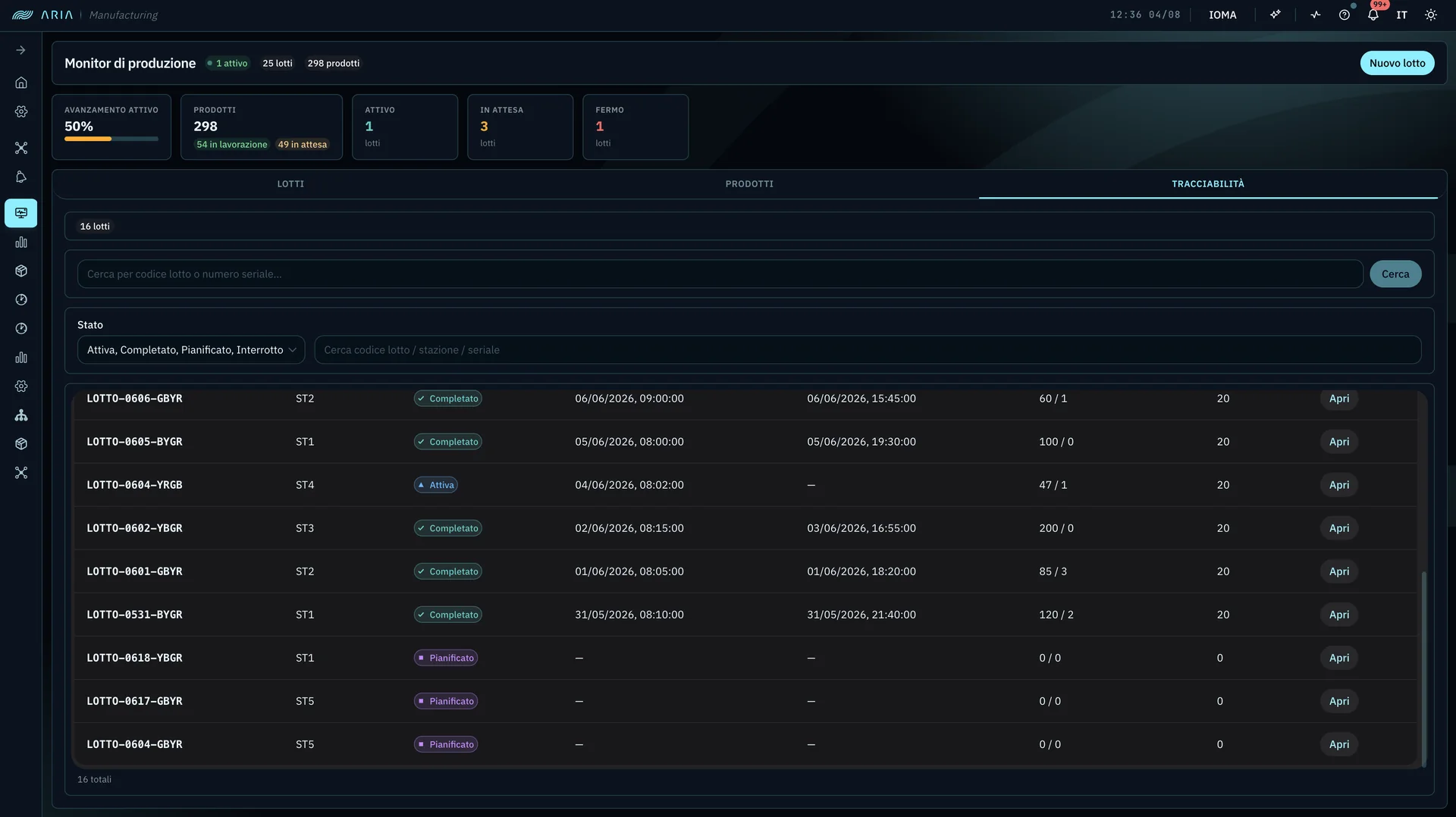
ARIA Track — Traceability tab of the production monitor: batch list with state, station, processing start and end, good and scrap counts, and search by batch code or serial number
Screen · 01

Part traceability · genealogy

The heart of ARIA Track: the list of batches with the state they are in — active, completed, planned, interrupted — plus the station, the processing start and end, good parts and scrap. From here you go down to the part: every row opens onto the products in that batch. Search works both ways — from a batch code down to its parts, or from a part's serial number back to the batch that produced it. Along the top, the picture right now: how many batches are active, waiting, stopped.

  • Batches with state: active · completed · planned · interrupted
  • Station, processing start and end, good parts and scrap
  • Search both ways: batch to part, serial to batch
  • Drill-down from the batch to the single product
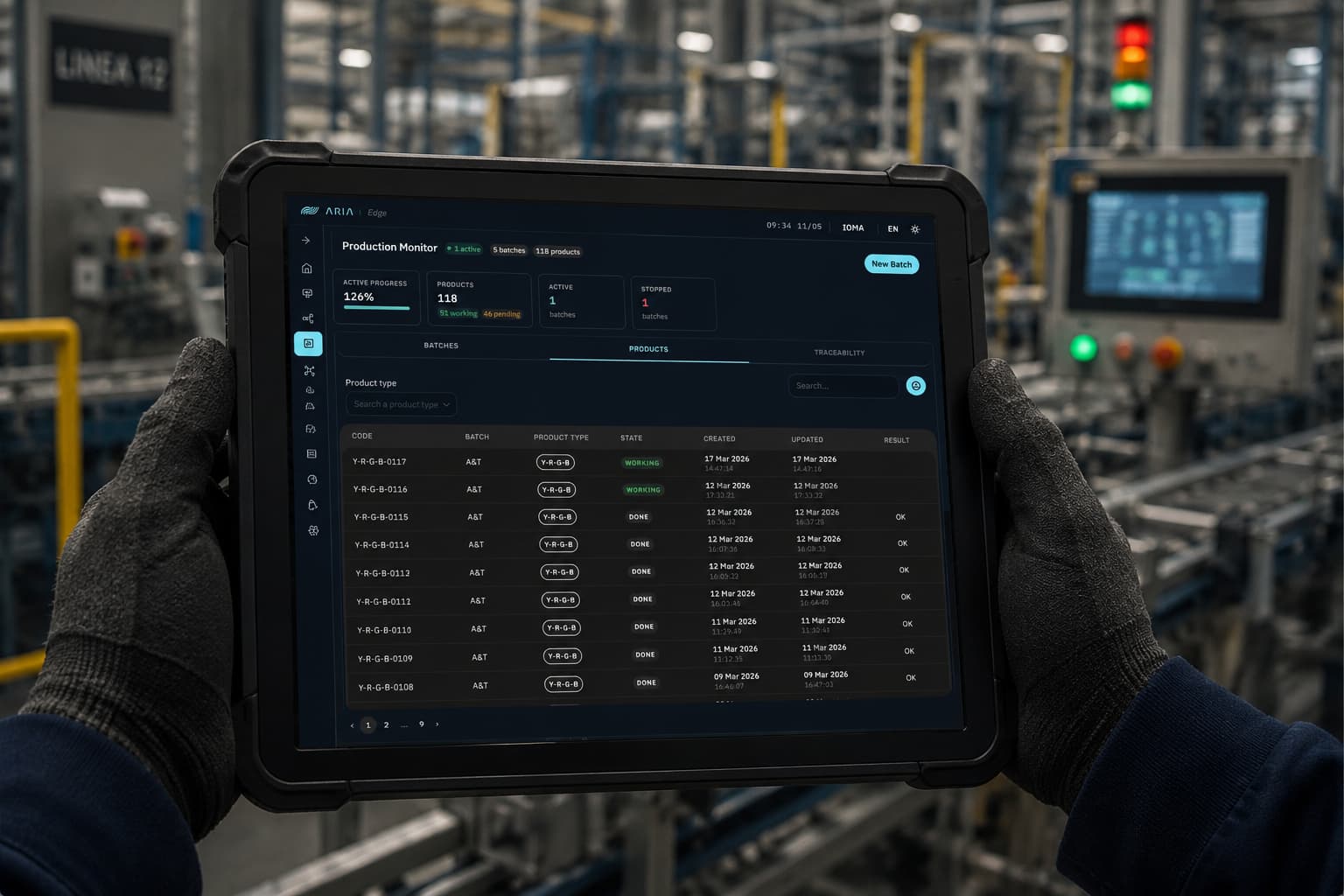
ARIA Track — Production monitor with batches on the line, status KPIs, and products table with code, batch, status, and timestamps
Screen · 02

Production monitor · batches on the line

What's going through the line right now: plan progress, total parts with working/pending, active and stopped batches. Below, the products table with code, batch, type, status, creation timestamp and last update, OK/KO outcome. Track observes and records — no command leaves this view.

  • Active and stopped batches · plan progress
  • Products table with status, timestamps, and outcome
  • Product-type filter · live search
  • Read-only: observes and records, does not command
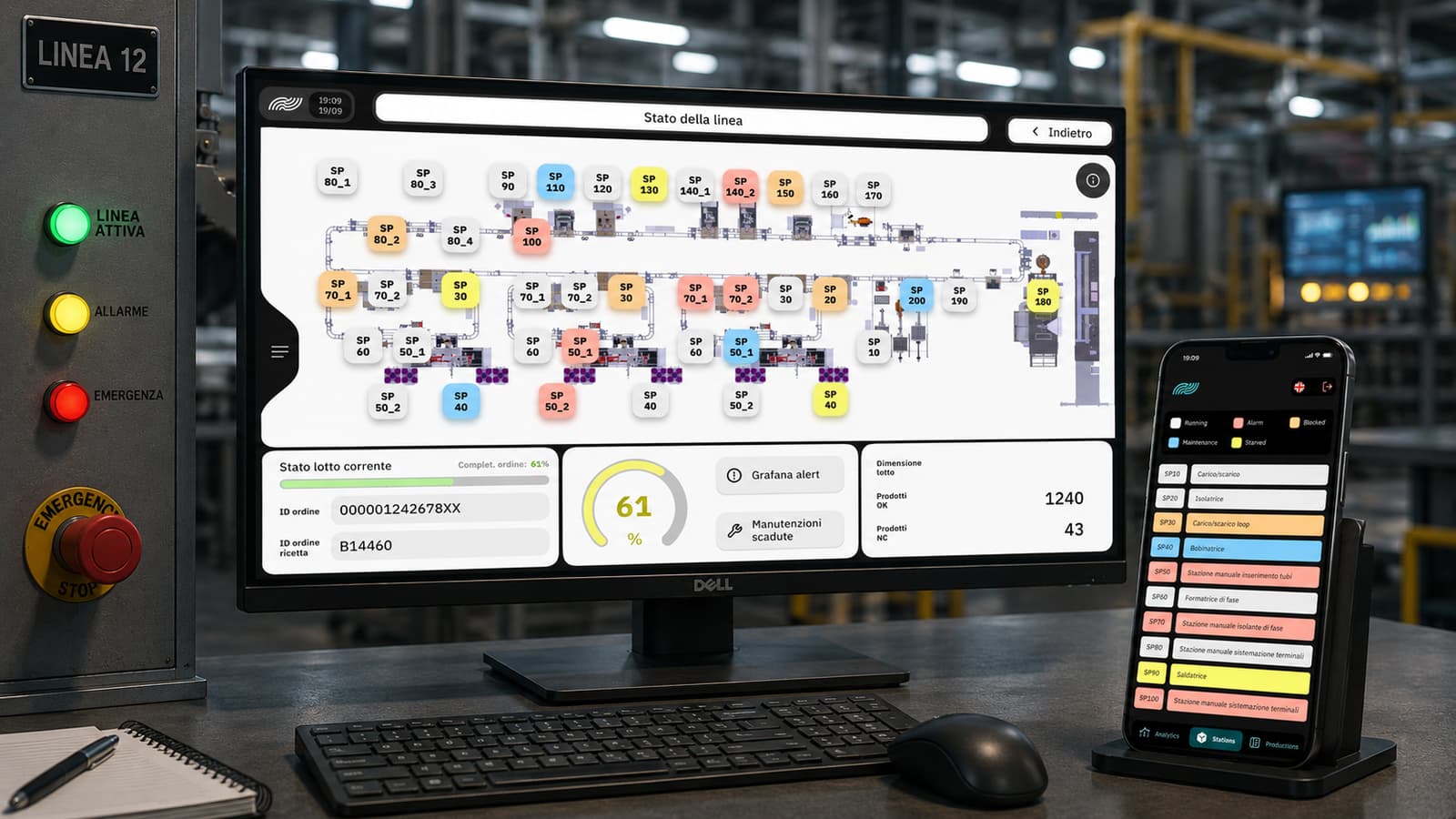
ARIA Track — Line status with plant layout, real-time station status, batch and active recipe
Screen · 03

Line status · live monitoring

The plant layout with every station and each one's real-time status (Running · Alarm · Blocked · Maintenance · Starved · Stowed), batch and active recipe. The same topology the shift lead starts from to open the genealogy of an in-progress batch.

  • Line layout, each station a node
  • Real-time status per station
  • Batch and active recipe at a glance
  • Starting point for batch genealogy

Need a full MES/SCADA? Discover ARIA MES/SCADA

Plans & pricing

One entry edition, one per-station fee

Production traceability without the complexity of a full MES. An OPEX model, a fee per monitored station — support, maintenance, and updates included.

Track

Traceability & genealogy only
€1,000per station / year

≈ €83 per station per month

Included:

  • Batch and part genealogy, down to the single part
  • Search by batch and by product
  • Event history and exportable traceability
  • Real-time station status
  • Line master data: stations, PLCs, batches

Track observes and records traceability — without sending commands to the PLCs and without a full MES/SCADA. Need more? → ARIA MES/SCADA.

Turnkey installation

From €4,000, + €500 per station

One-off: setup, PLC node mapping for traceability, testing, and commissioning. Example: a 4-station line = €6,000.

  • Prices exclude VAT. Annual fee paid upfront with yearly indexation; includes the usage license, Standard 8×5 support, maintenance, and updates.
  • Upgrade at any time to ARIA MES/SCADA Lite (€1,600) or Pro (€2,300): the traceability already in the field stays.
  • Discounts: −5% with 2-year prepayment, −10% with 3-year; −10% from the second plant.
  • Station = each production unit monitored in ARIA (a workstation, machine, or line supervision point). The number of stations depends on the plant architecture and supervision points, not on the number of machines.

How much does an MES or SCADA cost? The guide with market ranges

Questions · scope · cost

Let's assess ARIA Track on your case.

Let's see whether ARIA Track fits your case: what connects to the systems you already run, what changes for the people using it, and what it costs at your scale.

Do you resell or refer industrial software? See the IOMA partner programme

You might also want

Guides that go deeper on these topics.